
A MicroScribe turned up in a closet, or is sitting on eBay at a tempting price. Before spending anything on service or software, one question comes first: is this arm alive? There is now a page that answers it in about thirty seconds.
Does it still work?
That is the question behind a surprising share of the mail I get. A MicroScribe turned up in a closet when a lab was cleaned out. A used arm is sitting on eBay at a tempting price. Someone inherited one from a colleague who retired. Before spending anything on service or software, people want to know one thing: is this arm alive?
For years the only way to find out was to ask me. I would send software, walk someone through a setup, and wait to hear back. That takes real time on both ends, and it is a lot to ask of someone who just wants a yes or no.
So I built a place to get the answer.
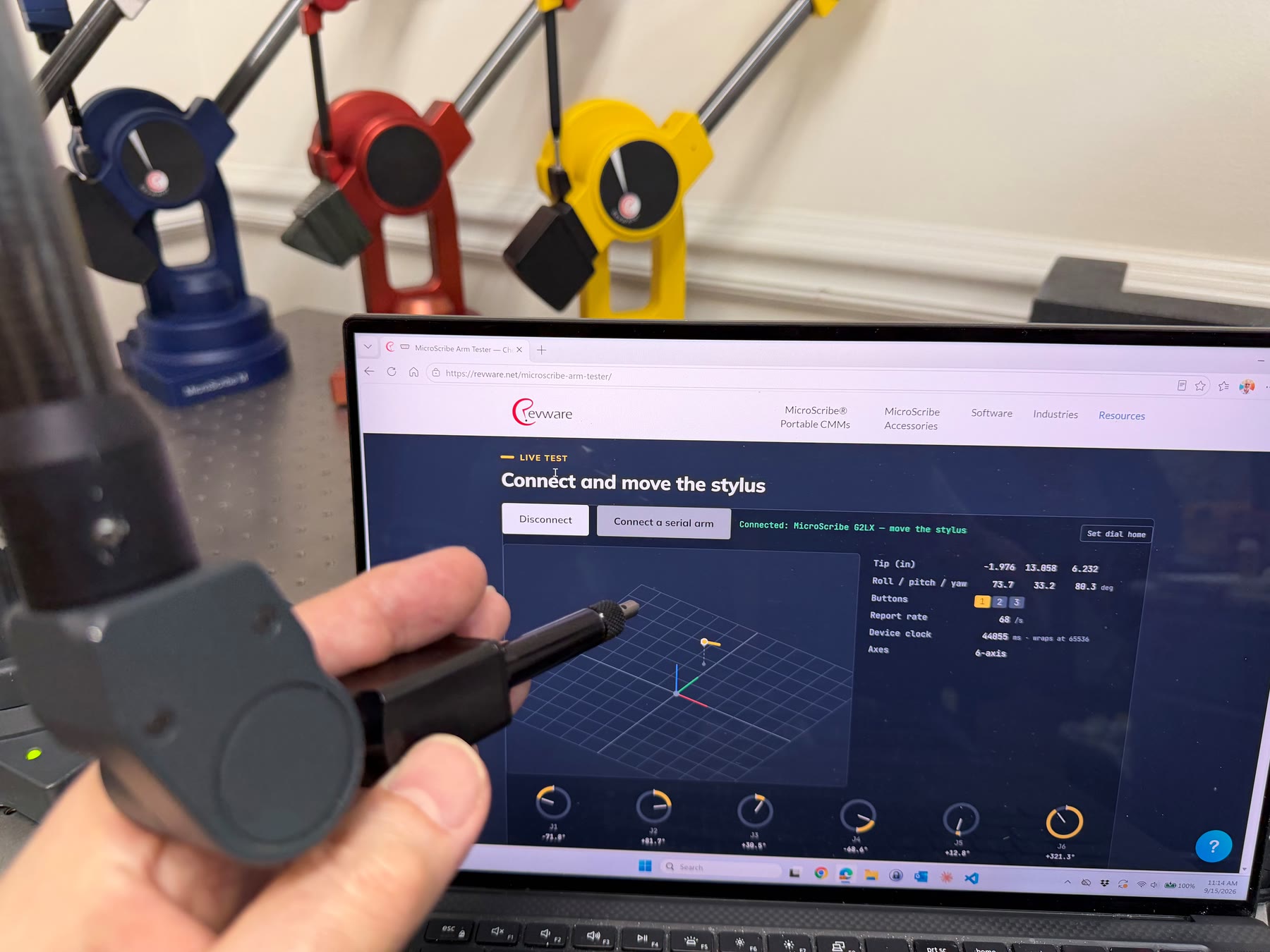
The MicroScribe Arm Tester is a page on this website. Open it in Chrome or Edge, plug in the arm, and move the stylus. If the arm is talking, you will see it: a live stylus view, a dial for every joint, button indicators that light when you press them, and position and orientation readouts that follow your hand. Nothing to download, nothing to install. The connection stays on your computer.
It works with any MicroScribe ever made. USB arms connect directly. The original serial arms connect through a serial port or an inexpensive serial-to-USB adapter, the same way they always have.
Use Chrome or Edge on a desktop or laptop. Other browsers cannot open USB devices or serial ports, and phones and tablets cannot either. Tested on Windows and Mac; Linux should work as well.
Close MUS and any other program that uses the arm.
Leave the arm resting in its home position until the page says it is connected.
Serial arms need a serial port or a serial-to-USB adapter. Direct the page to the COM port the adapter creates.
A quick word on what it proves. The tester confirms that an arm communicates and reports its position and orientation. It does not measure how accurately it does so. That is a different job, and one we are glad to do. But if you are staring at a listing or an old case and wondering whether to bother, this answers the first question in about thirty seconds.
When you are done, you can copy the diagnostic to your clipboard and follow the link to our contact page, where you decide whether to send it to us for review. Nothing leaves your computer unless you send it.
One more thing. The tester runs on the same browser-based core we are preparing for a future MicroScribe SDK release. Consider this a preview.
Try it on an arm, any age, any model, and tell me what you found. I would like to hear about the ones that surprise you.
About Revware
Revware provides high, quality, simple to use, innovative, cost-effective modeling solutions to solve your design, metrology, and engineering problems.